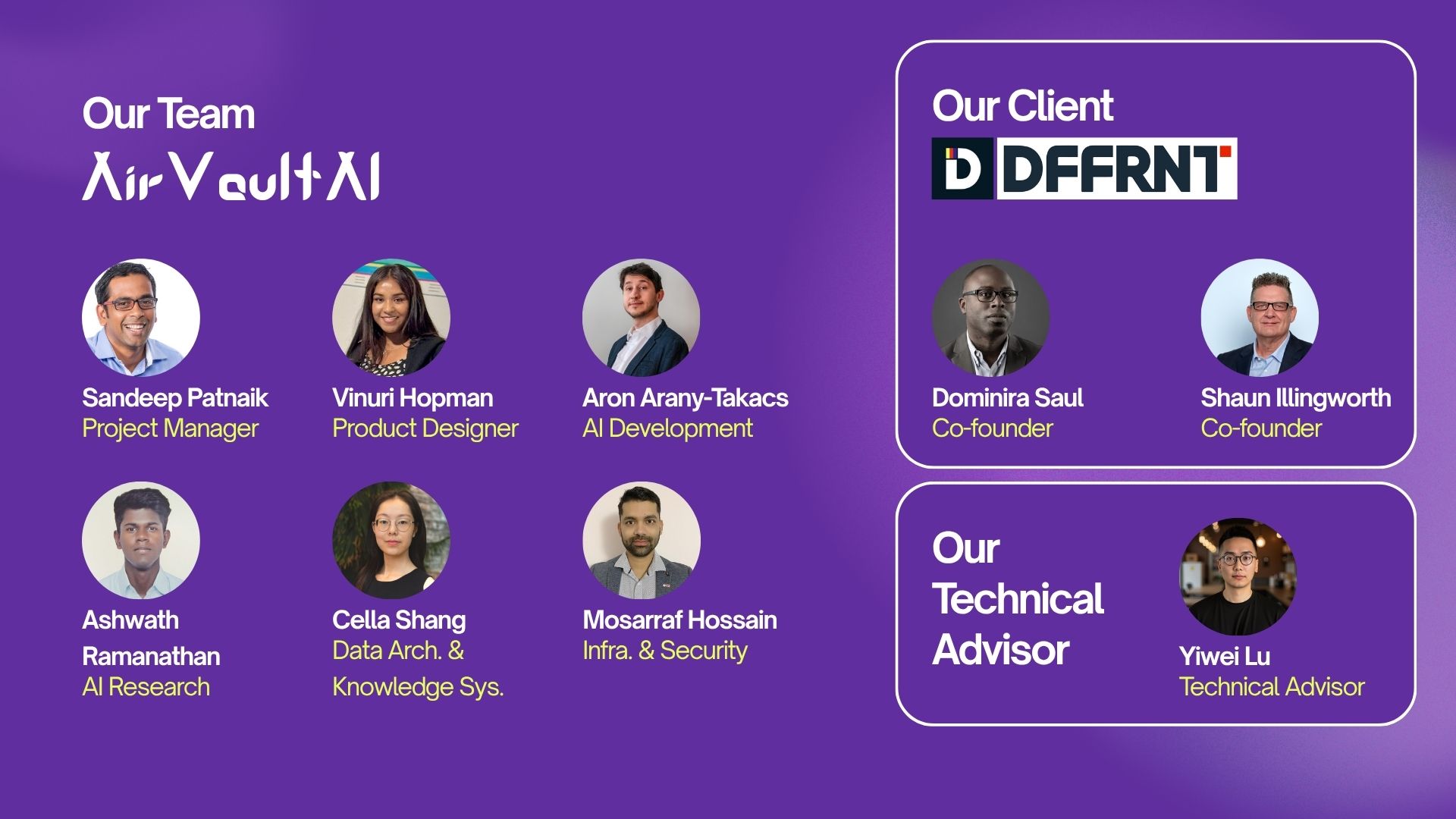


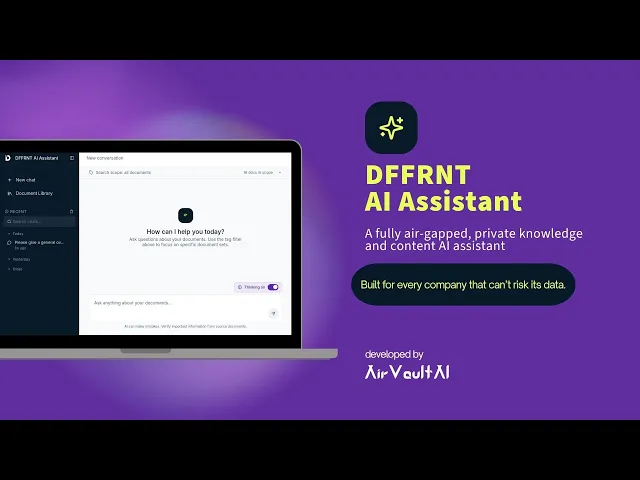
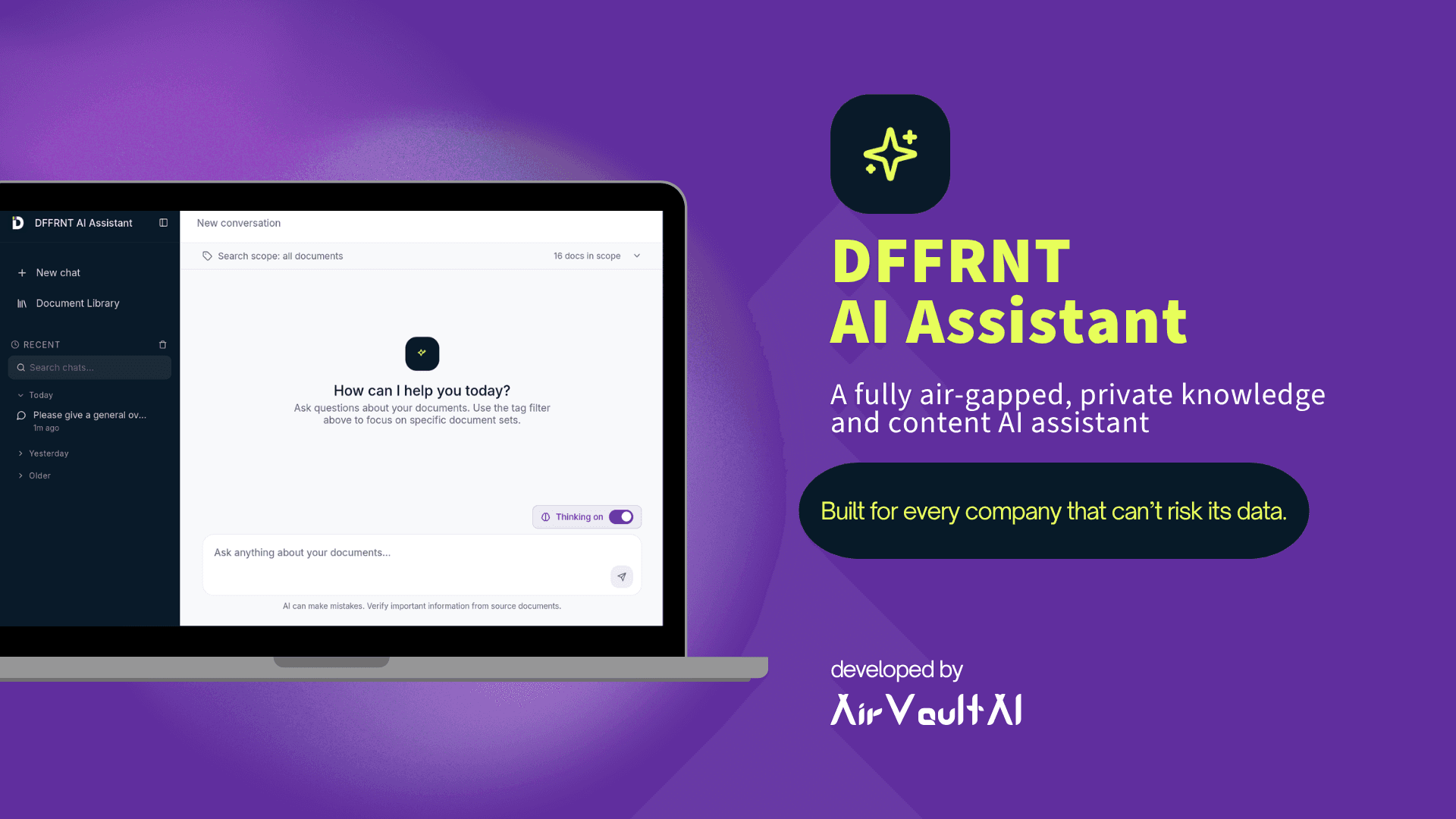
Hi, I’m Dokie, Vinu’s supervisor. Short on time? Let me walk you through DFFRNT’s private AI assistant in 2 minutes.
2:08
Product Design for a Client (A University Project for Industry Internship Course at uOttawa)
A Private Air-Gapped AI Assistant that shows its sources
Overview
Designed a fully air-gapped private AI knowledge assistant for DFFRNT that runs entirely on the company's own hardware, allowing employees to securely search internal knowledge without sending any data to the cloud. This project was completed as part of the University of Ottawa's course, providing the opportunity to solve a real-world business challenge for an external client.
Tools
Figma
The Client
DFFRNT is a strategic design and consulting firm with years of accumulated organizational knowledge, including client proposals, project documentation, case studies, HR records, and internal resources. Over time, this information became scattered across multiple storage systems with no centralized way to search or retrieve it efficiently.
The Challenge
Employees spend significant time manually searching documents to prepare proposals, create RFP-specific resumes, draft case studies, and reference previous work. The fragmented nature of the firm's knowledge base makes these repetitive tasks slow, inefficient, and difficult to scale.
While cloud-based AI tools such as ChatGPT and Microsoft Copilot could streamline these workflows, DFFRNT cannot use them because client confidentiality agreements prohibit uploading sensitive information to external services.
As a result, the firm misses out on the productivity gains that AI offers while continuing to rely on time-consuming manual processes.
Key Problems
Company knowledge is fragmented across multiple storage locations, making information difficult to find.
Employees spend 15–30 minutes searching for information needed for everyday work.
Preparing proposals, RFP-specific resumes, and case studies requires 2–4 hours of repetitive manual effort.
Confidential client information cannot be shared with public cloud AI services.
Problm Statement
How might we enable employees to quickly retrieve and leverage the company's internal knowledge while ensuring all confidential data remains completely private within DFFRNT's infrastructure❓
Defining User Needs
Primary User
Consultants at DFFRNT who regularly work with a large collection of confidential business documents
These users frequently need to retrieve information, prepare client-facing documents, and leverage knowledge from previous engagements while maintaining strict client confidentiality.
User Needs
Through stakeholder interviews, the following core user needs were identified:
Centralized & Searchable Knowledge
Users need a single place to search and retrieve information from all company documents instead of manually searching across multiple disconnected repositories.
Transparent & Trustworthy Answers
Users need confidence that AI-generated responses are accurate and verifiable through citations to the original source documents.
Accurate Information Retrieval without Hallucinating
Users need consistent and reliable answers that remain accurate as the company's knowledge base continues to grow.
4. Complete Data Privacy
Users need assurance that confidential company and client information never leaves the organization's infrastructure and is never transmitted to third-party AI services.
Simple & Intuitive Experience
Users need an interface that anyone in the organization can use without training, allowing them to ask questions in natural language and quickly find relevant information.
The Solution
How about being able to upload all your confidential files to an AI and ask a question in simple language to retrieve your desired answers❓
We designed a fully air-gapped AI knowledge and content assistant that securely transforms DFFRNT's fragmented documents into a centralized, searchable knowledge base (Satisfies User Need 1).
Employees can retrieve information and generate business content through a natural language chat interface (Satisfies User Need 5), with every response grounded in internal documents and supported by source citations (Satisfies User Need 2).
All data remains within the company's infrastructure (Satisfies User Need 4), and when no relevant information is found, the assistant clearly communicates this instead of generating unsupported answers (Satisfies User Need 3).
How it works:
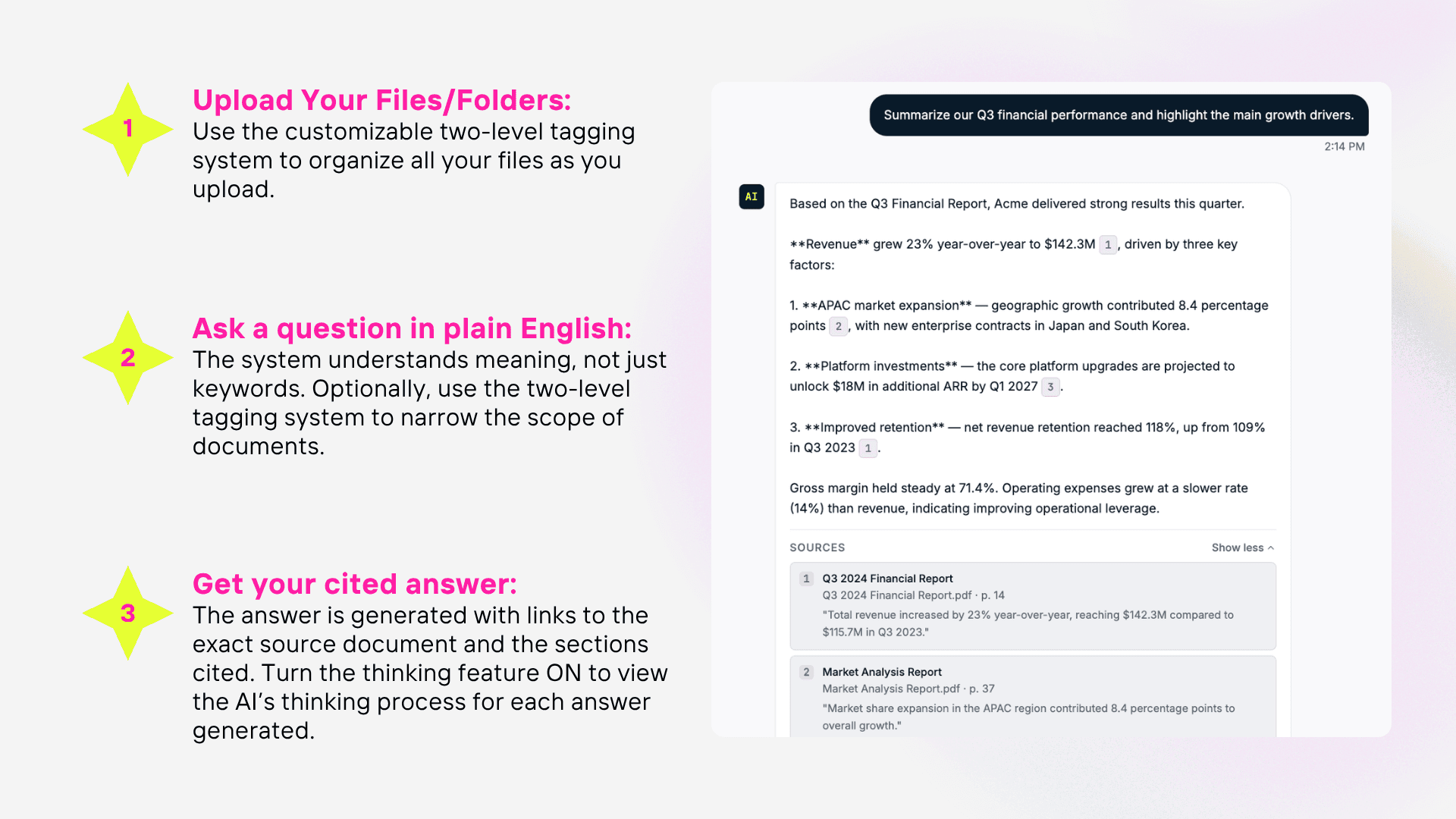
Try Our Solution
Use the below prototype to experience DFFRNT AI Assistant solution that we designed for our client.
Note: The questions you ask, the documents you upload and history will not be saved
Research & Inspiration
Interview with Client
To understand the business needs, our team interviewed stakeholders at DFFRNT to gain insight into their existing workflow, pain points, and vision for the solution. The interview revealed the above-mentioned challenge and the key problems.
Exploring Existing Solutions
Although the final product needed to operate in a secure, air-gapped environment, I studied established conversational AI products to understand user expectations and interaction patterns.
I analyzed interfaces such as ChatGPT and Claude, focusing on how they structure conversations, organize chat history, present source citations, and support knowledge retrieval. These patterns served as design inspiration while adapting the experience to meet DFFRNT's privacy and security requirements.
Design Takeaways:
A simple chat interface lowers the learning curve for users.
Conversation history helps users revisit previous queries and maintain context.
Source citations increase transparency and trust in AI-generated responses.
A searchable knowledge library supports efficient navigation of large document collections.
Design Process
Ideation
Following the research phase, each team member independently explored solution ideas through sketches, written concepts, and AI-generated interface prototypes. As the Product Designer, I synthesized these ideas to identify common interaction patterns and translate them into a cohesive product direction.
Rather than selecting a single concept, I combined the strongest ideas that aligned with both the client's goals and users' expectations.
Common Design Patterns Identified:
Conversational, multi-turn AI chat
Persistent chat history
Centralized document library
Sidebar navigation for quick access to key features
These patterns formed the foundation of the product's information architecture and interaction design.
User Journey Mapping
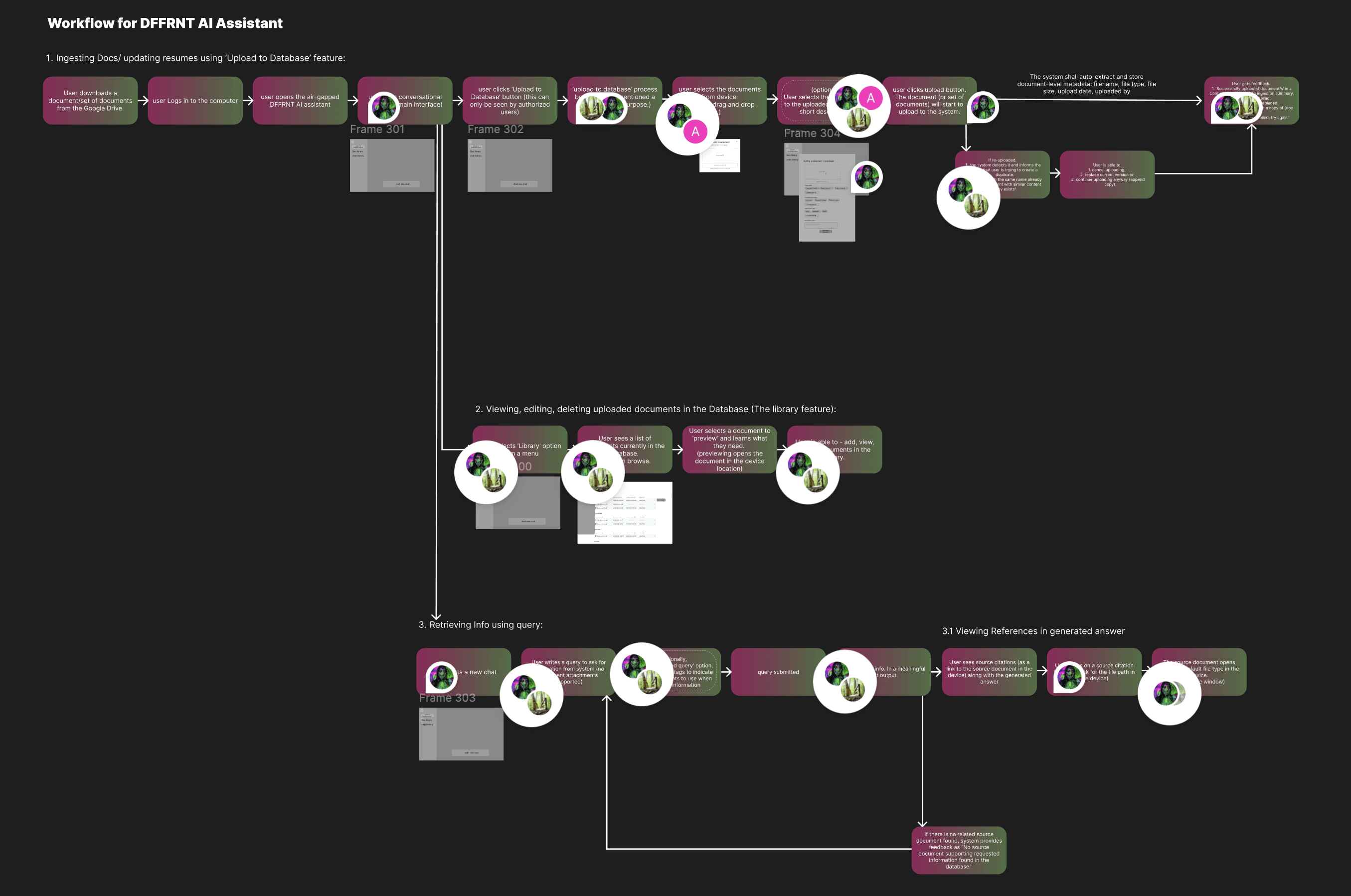
Before designing high-fidelity screens or beginning development, our team collaborated extensively to map the complete user journey in Figma. This workflow became the project's primary decision-making tool and ultimately shaped both the user experience and the system architecture.
The visual workflow allowed us to evaluate ideas, identify edge cases, and align on functionality before any code was written. It also served as a communication tool to present the proposed solution to the client and obtain approval prior to development.
Core User Flows:
1.Upload to Database:
Upload files and folders, Update knowledge base with new information
2.Manage Knowledge Library:
View uploaded documents, Edit tags, Delete outdated content
3.Query the Knowledge Base:
Ask questions in natural language, Retrieve AI-generated answers with supporting source citations
Mapping the user journeys helped the team:
Define the functionality required for every interface.
Design a workflow that felt intuitive for non-technical users.
Determine what information needed to be stored and retrieved by the backend.
Align frontend and backend development around a shared system model.
Evaluate alternative solutions and make informed design decisions. e.g: two-level tagging system
Prioritize features based on the project's scope and timeline.
This collaborative planning significantly reduced ambiguity during development and ensured the final solution reflected both user needs and technical constraints.
Visual Direction
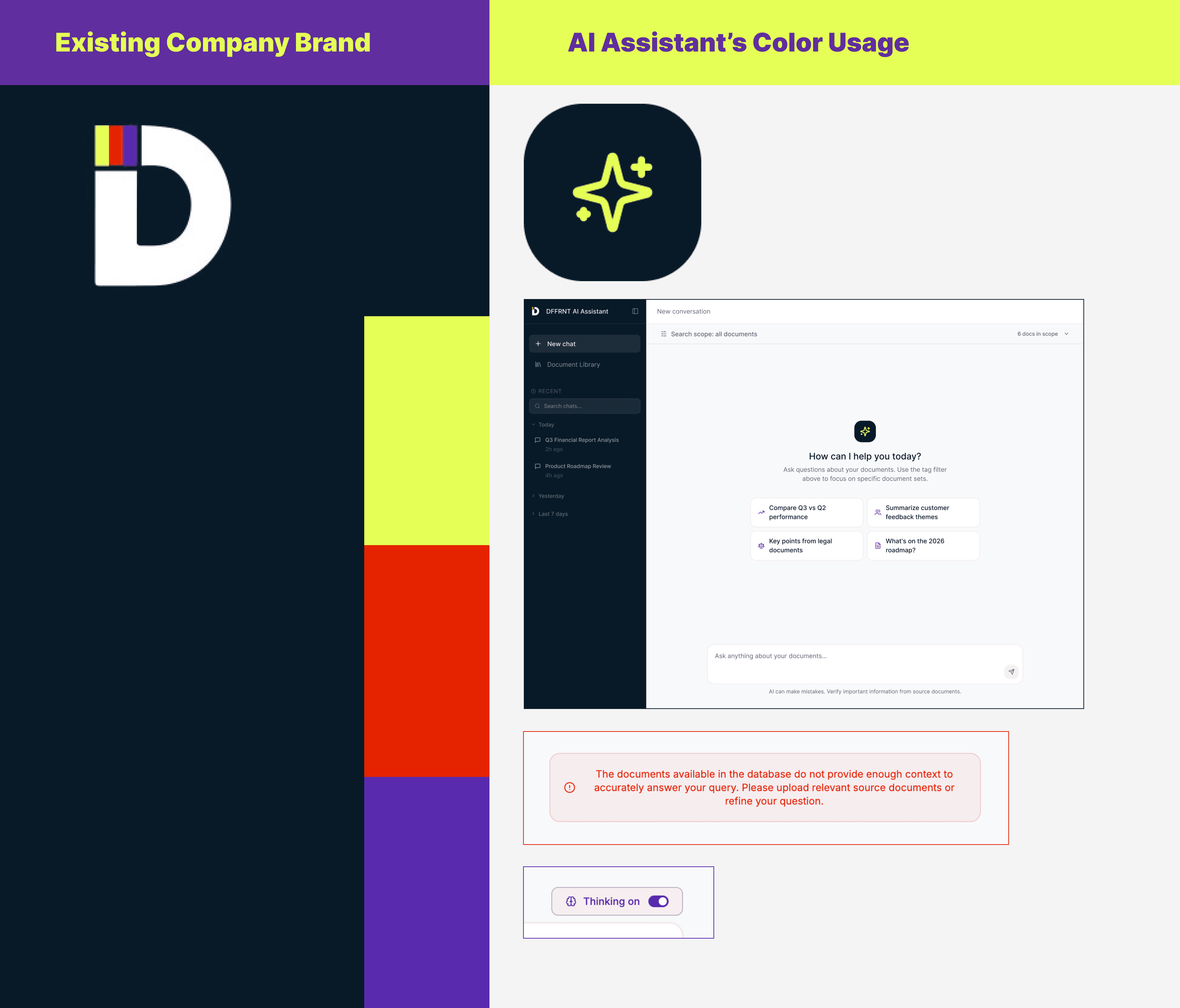
Since the product was designed for an existing organization, I aligned the interface with DFFRNT's established brand identity to create a familiar and cohesive user experience.
Rather than introducing a completely new visual language, I adopted the company's existing color palette and visual style while designing modern, AI-focused interfaces. This approach strengthened brand consistency and helped position the assistant as a natural extension of DFFRNT's internal tools.
Key UX Decisions
Searchable & Maintainable Document Library (Supporting User Need 1)
To support DFFRNT's growing collection of internal documents, I designed a centralized document library that allows users to upload, search, and manage files from a single interface. The system supports uploading individual files, multiple files, or entire folders, making it practical for maintaining a large knowledge base.
Beyond simply storing documents, the library enables users to edit descriptions and organize content using customizable tags while preserving original filenames and file metadata. This helps keep the knowledge base structured and easy to maintain as it grows over time.
UX Value:
Reduces the effort of managing large document collections.
Makes information easier to organize, find, and maintain.
Supports long-term scalability without increasing complexity for users.
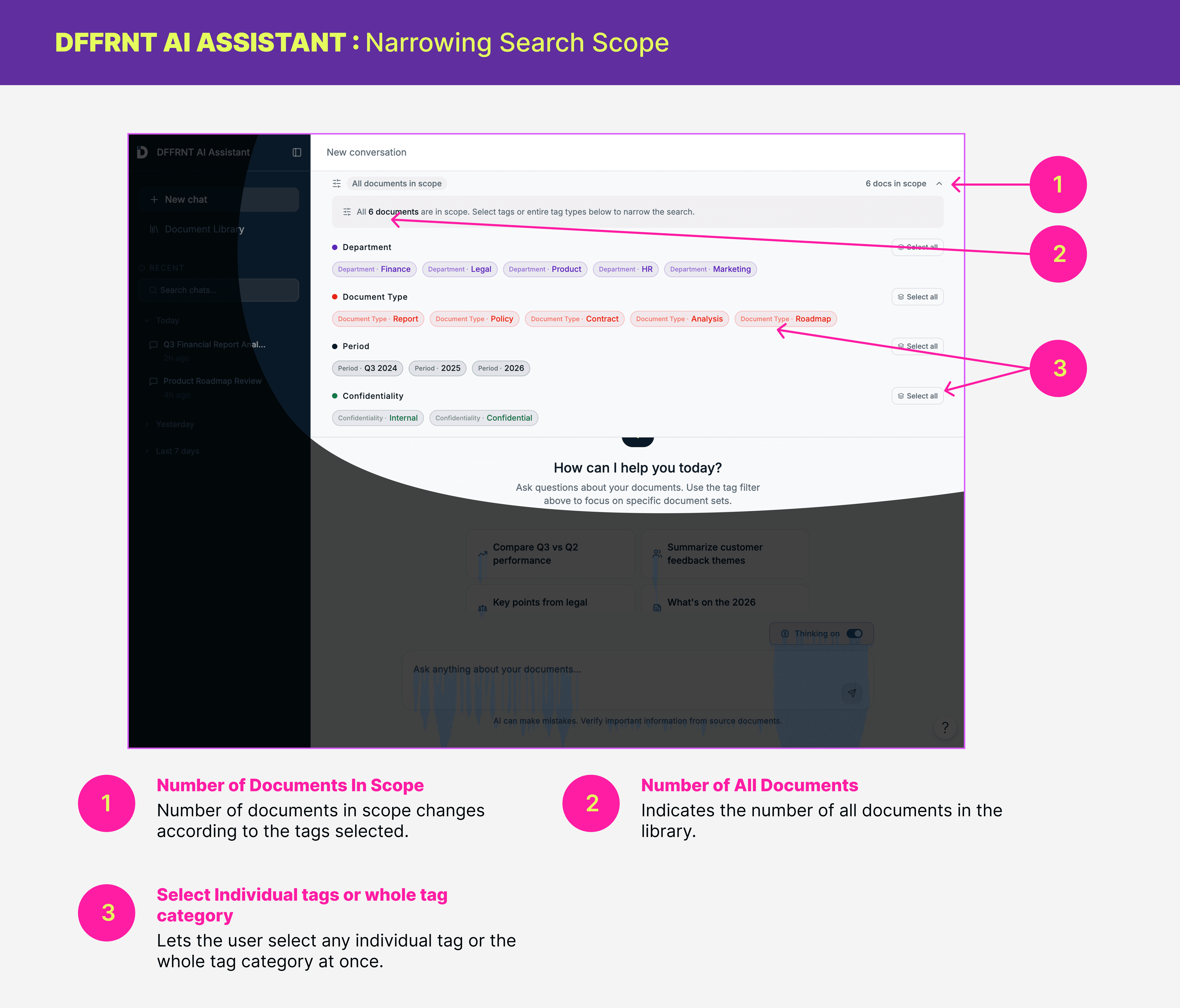
Customizable Two-Level Tagging System (Supporting User Need 1)
To help users manage a growing collection of documents, I designed a customizable two-level tagging system that organizes content according to the user's mental model rather than relying solely on AI-generated classifications.
Documents can be grouped under broad categories (e.g., Projects) and further organized into specific subcategories (e.g., Project A, Project B, Project C). Users can assign tags while uploading files or later from the document library, and tags applied to a folder are automatically inherited by all files within it, making it efficient to organize large batches of documents.
A dedicated Tag Manager allows users to create, edit, and maintain their own taxonomy as the knowledge base evolves.
UX Value:
Supports users' mental models by allowing them to organize information in ways that make sense to their workflow.
Improves findability by grouping related documents into meaningful categories.
Reduces repetitive effort through bulk tagging of folders and their contents.
Provides flexibility to adapt the document structure as the organization grows.
The AI uses its own embeddings to retrieve information, while the tagging system exists for the humans.
Duplicate File Detection (Supporting User Need 1)
To maintain a clean and reliable knowledge base, I included duplicate file detection in the document upload workflow. When a user attempts to upload a file that already exists, the system immediately notifies them and prevents duplicate entries.
UX Value:
Keeps the document library organized and free of redundant content.
Reduces user errors during bulk uploads.
Improves trust in search results by avoiding duplicate documents and repeated information.
Simplifies long-term maintenance of the knowledge base.
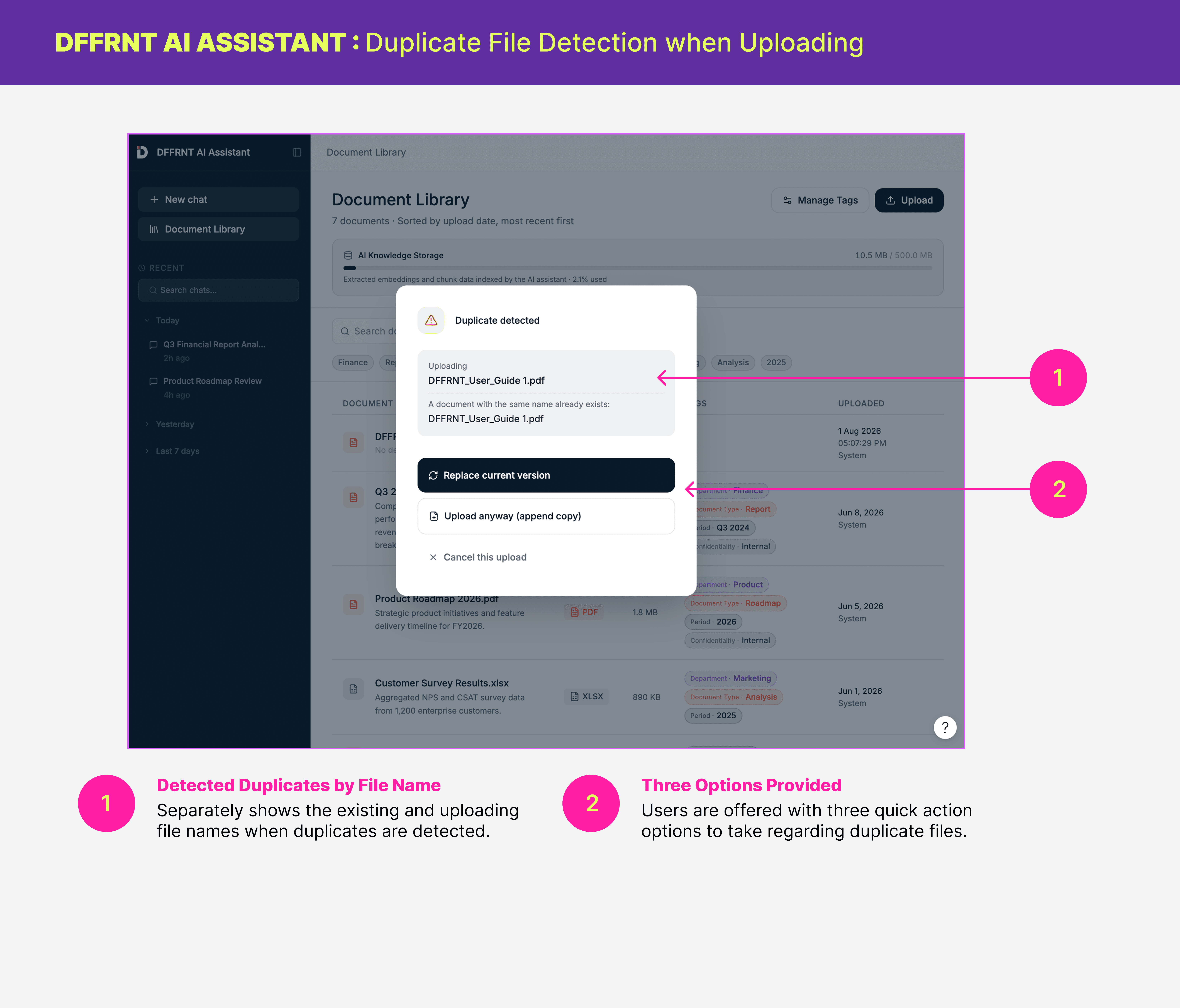
Narrowing the Search Scope (Supporting User Need 3 & 5)
I extended the two-level tagging system to support scoped searches, allowing users to limit AI queries to specific categories or subcategories of documents. Instead of searching the entire knowledge base, users can focus on only the documents relevant to their task.
For example, a user preparing an RFP response can search only within documents tagged under a particular project or business area, resulting in more targeted and relevant responses.
This feature follows the principle of progressive disclosure: users can simply ask a question and search the entire knowledge base by default, while those who need greater precision can optionally narrow the search scope.
UX Value:
Reduces cognitive load by exposing advanced search options only when needed.
Improves the relevance and accuracy of AI-generated answers.
Gives users greater control over how information is retrieved.
Reduces noise by excluding unrelated documents from the search.
Supports detail-oriented tasks such as proposal writing and knowledge discovery.
View AI Thinking - Process Transparency (Supporting User Need 2)
To increase transparency and user trust, I designed an optional feature that allows users to view how the assistant arrived at its response. Users can enable this mode with a toggle to inspect the retrieval and reasoning process behind an answer.
This follows the principle of progressive disclosure by keeping the interface clean for everyday use while making additional explanation available when users want to verify or better understand a response.
UX Value:
Increases transparency and trust in AI-generated responses.
Helps users understand how answers are derived.
Supports verification when working with important business information.
Keeps advanced details optional to avoid overwhelming everyday users.
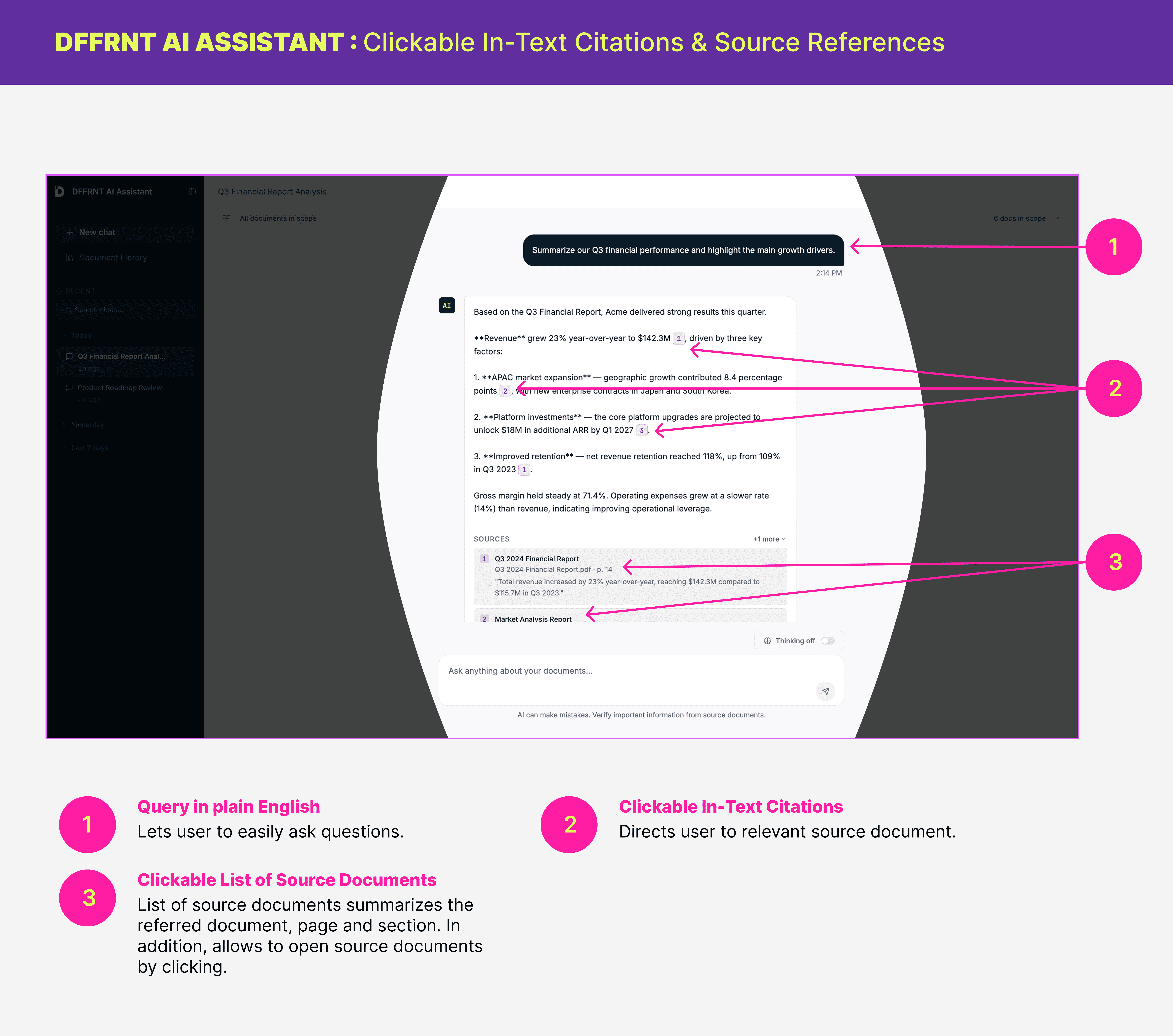
Clickable In - Text Citations & Reference Links for Source Documents - Evidence Transparency (Supporting User Need 2)
To build trust in AI-generated responses, I designed an evidence transparency system that connects every answer to its supporting source documents. Each citation displays relevant details such as the document name, page number, and referenced content, allowing users to quickly verify the information.
Users can click on citations to open the original source document directly on the local system, without requiring an internet connection. This allows employees to validate AI responses instead of blindly accepting generated answers.
The citations reduce the user's cognitive burden of "trusting the AI." Instead, the system shifts trust from the AI itself to the evidence behind the answer.
UX Value:
Builds trust by making AI responses traceable and verifiable.
Reduces the effort required to validate important information.
Keeps users within the workflow by providing immediate access to supporting documents.
Supports confident decision-making when working with sensitive business information.
Explicit Refusal to Generate Unsupported Answers (Supporting User Need 3)
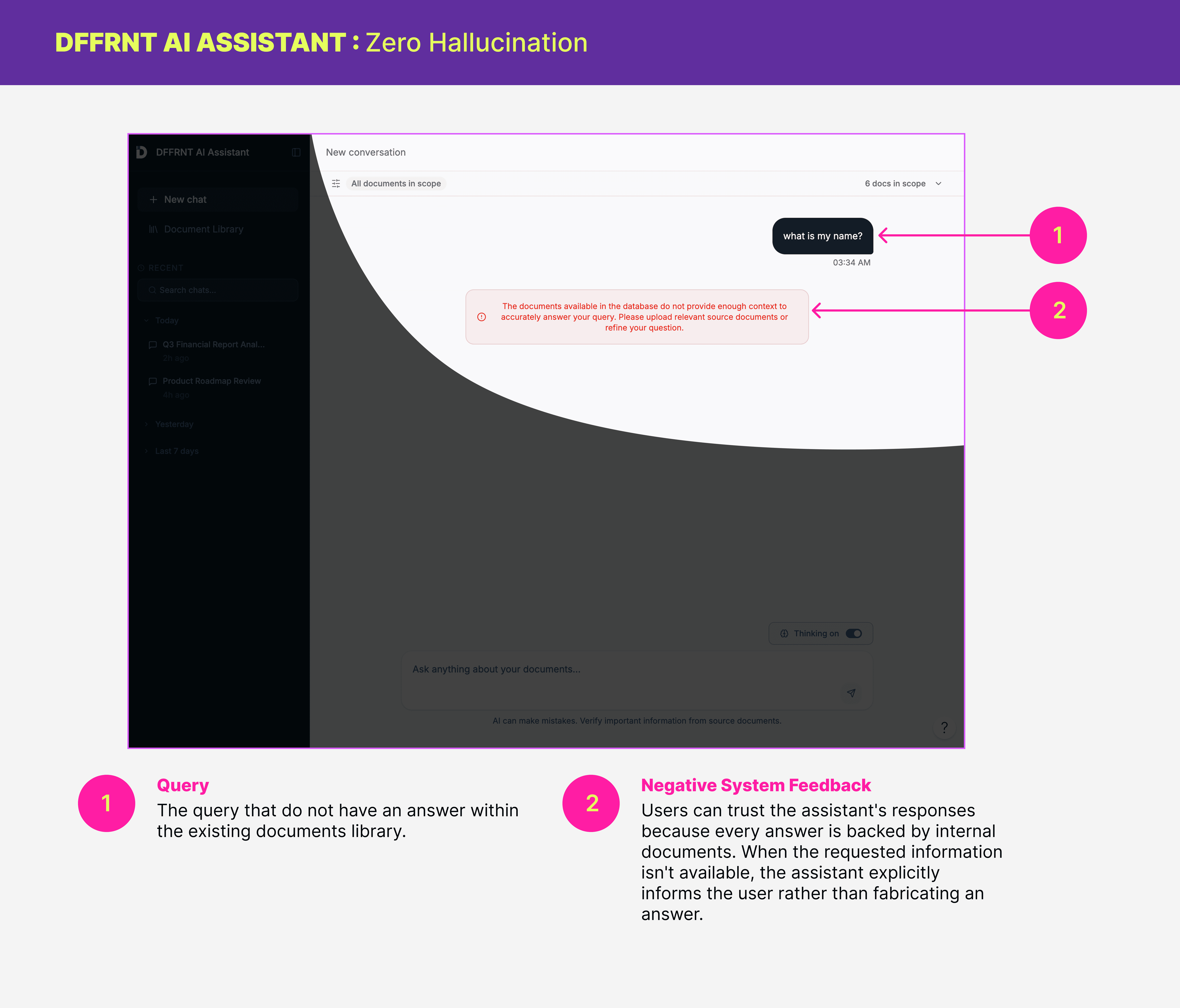
To improve reliability and user trust, the assistant is designed to provide answers only when relevant information exists within the internal document library. When supporting sources cannot be found, the system clearly communicates that it does not have enough information to answer rather than generating unsupported responses.
The documents available in the database do not provide enough context to accurately answer your query. Please upload relevant source documents or refine your question
This behavior is enabled through a Retrieval-Augmented Generation (RAG) approach, where responses are grounded in retrieved company documents instead of relying only on the language model's general knowledge.
UX Value:
Prevents users from acting on inaccurate or fabricated information.
Builds trust by making the assistant transparent about its limitations.
Encourages users to rely on verified company knowledge rather than assumptions.
Improves confidence when using AI for business-critical tasks.
Project Achievements
Built a working air-gapped AI assistant that runs locally with Ollama, Qdrant, and a browser UI.
Integrated document upload, ingestion, retrieval, citation, and chat into one cohesive product flow.
Implemented tag-based scoping and saved conversations to improve usability and retrieval control.
Reflection
Growth as a designer → moving beyond UI into product thinking
This project strengthened my ability to design and contribute across the full product development process from understanding user needs and creating UX solutions to collaborating with developers and communicating the product vision.
Working with constraints → real-world deadlines and tradeoffs
Working on a real client project with a tight timeline challenged me to make thoughtful design decisions while balancing user needs, technical constraints, and business goals. I gained experience using emerging AI tools, including Figma Make for rapid prototyping and AI-assisted video creation tools for developing marketing content, which helped me explore faster and more efficient design workflows.
Collaboration → working effectively with technical and non-design teammates
Beyond technical skills, this project reinforced the importance of effective teamwork. A successful product requires a team culture built on being responsive, responsible, and respectful, communicating openly, supporting each other, and making decisions together in the best interest of the product.